Protected in one tap
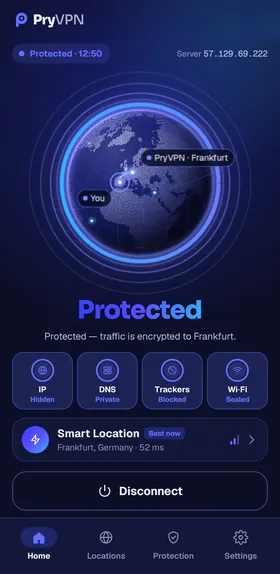
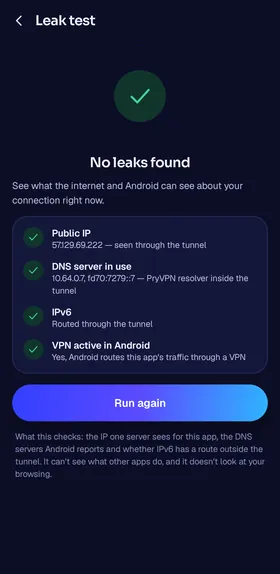
One tap hides your IP address, keeps your DNS private, blocks trackers and seals the Wi-Fi network. The app shows each one at a glance.
PryVPN encrypts your connection with WireGuard, keeps no activity logs and never sells your data. Here is why it exists, how it protects you, the servers it runs on, who pays for it and how to reach us.
Who pays for the servers, and what happens to your data? Many free VPNs pay their bills with ads, with data about their users, or by holding back the free version until you upgrade. That makes it hard to trust any of them.
PryVPN answers both questions in writing. Our privacy policy lists what we store, in what form and for how long, and our transparency report counts what we are asked for and what we hand over.
The app stays simple: one tap to connect, a state you can read at a glance, and plain words about what a VPN does and doesn't do.
Every connection takes the same path: encrypted on your phone, filtered on our server, and out to the internet with our IP address instead of yours.
WireGuard encrypts your traffic before it leaves your phone, so the Wi-Fi network and your internet provider see only an encrypted stream.
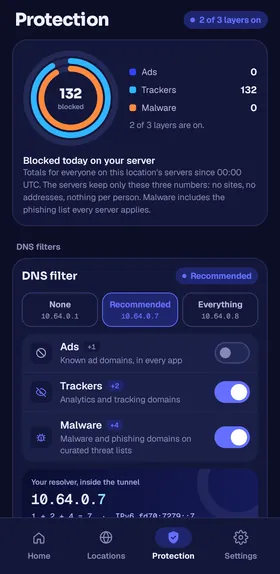
Our DNS resolver works inside the tunnel and blocks the tracker and malware domains you choose, in every app.
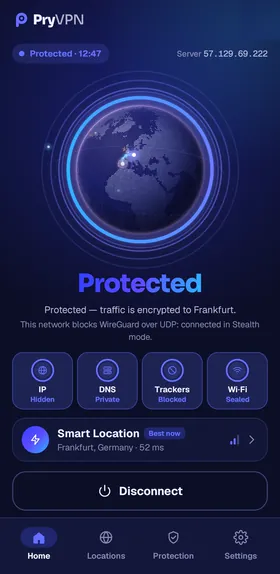
Websites and apps see the IP address of a PryVPN server, not yours. On networks that block VPNs, Stealth mode carries the tunnel over TLS on port 443.
Everything a VPN should do for you, in an app you understand at a glance.
One tap hides your IP address, keeps your DNS private, blocks trackers and seals the Wi-Fi network. The app shows each one at a glance.
The modern, fast VPN protocol, between your phone and our servers.
On networks that block VPNs, the tunnel switches to TLS on port 443, so you can still connect.
DNS filters you choose, applied on our servers to every app on your phone.
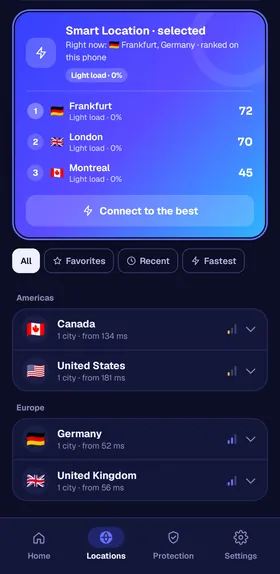
Ranks our servers for your phone right now and connects you to the best one.
Sign up with Google, or with an email and a password. No name, phone number or card, and you are connected in a minute.
Every location is a server we set up and run ourselves, with the same protection in each one. Smart Location picks the best one for you.

Real screens of the PryVPN app for Android: a state you read at a glance, real locations and protection you can check.
Privacy in PryVPN isn't a setting you have to find: it shapes how the app and our servers work, from the key on your phone to the server you connect to.
Our privacy policy lists everything we store, in what form and for how long.
The app creates your WireGuard key on your phone and keeps it there.
Your traffic travels encrypted from your phone to our server, on any Wi-Fi.
We don't store the websites you visit or the content of your traffic.
We build and run the network ourselves, with servers in several countries. PryVPN puts no ads in your traffic and never sells data.
Everything is included from the first tap: WireGuard, Stealth mode, Smart Location and the Kill Switch.
Trust shouldn't depend on our word. These pages say exactly what we do, and each one is kept up to date.
Exactly what we store, in what form and for how long, and what we never collect.
Read the policyTransparencyTransparency reportWhat authorities and others ask us for, how we answer, and what we hand over.
See the reportSecuritySecurity and disclosureHow we protect the service, and how to report a vulnerability to us.
Security pageAbuseAbuse policyHow our servers stop spam and attacks without watching who you are.
How it worksEditorialEditorial policyHow we write our guides, check facts, use AI and correct mistakes.
Read the policyPick the address that matches your question, so it reaches the right inbox straight away.
| Topic | Address |
|---|---|
| Help with the app | support@pryvpn.com |
| Privacy and your data | privacy@pryvpn.com |
| Security vulnerabilities | security@pryvpn.com |
| Abuse reports | abuse@pryvpn.com · or use the report form |
| Authorities and legal matters | legal@pryvpn.com |
| Press | support@pryvpn.com |
Encryption on any Wi-Fi, no activity logs and WireGuard speed, on your Android phone.